
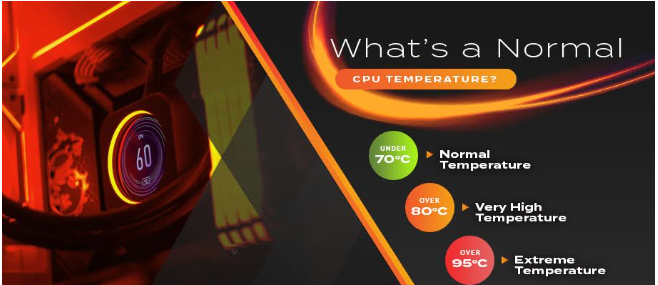
If you’ve ever checked your computer’s temperature and suddenly seen a number like 75°C or 85°C, you might have wondered, “Is that actually okay?”
It’s a common question. Your CPU gets warm when it’s working, and that’s normal. The tricky part is knowing when the heat is simply part of normal operation and when it could mean there’s a cooling problem.
What Is a Normal CPU Temperature?
The right temperature depends on your processor, computer case, cooling system, workload, and even the temperature of the room.
There isn’t one magic number that works for every computer.
When your PC is sitting idle and you’re not doing much, you may see temperatures somewhere around 30°C to 50°C. If you’re browsing websites, watching YouTube, checking emails, or working on documents, it can be a little higher.
Once you start doing heavier work, things change.
Gaming, video editing, 3D work, software development, and other demanding tasks can push the processor much harder. In those situations, temperatures around 60°C to 85°C aren’t unusual for many modern systems.
You may also notice quick temperature jumps. For example, your CPU could sit at 45°C and suddenly jump to 60°C when you open a program. That’s not necessarily a problem. CPUs constantly change their speed and power usage depending on what’s happening.
What About CPU Temperature While Gaming?
Gaming can put a decent amount of pressure on your processor, especially with CPU heavy games.
For many computers, somewhere around 60°C to 80°C during gaming is generally fine. Some systems may run cooler, while others can run a little warmer.
Laptop CPUs are another story. Laptops have much less space for cooling, so their processors can reach higher temperatures than desktop CPUs.
Seeing 80°C for a short period doesn’t mean your CPU is about to fail. Modern processors are designed with temperature limits and safety features.
The thing you want to avoid is having the CPU sit near its maximum temperature for hours every time you play a game.
How Hot Is Too Hot?
This is where your processor’s specifications matter.
Many modern CPUs have maximum temperature limits somewhere in the 90°C to 100°C range. The exact number depends on the specific processor.
If your CPU reaches a high temperature for a few seconds, there’s usually no reason to panic. But if it stays extremely hot during normal tasks, something may be wrong.
You might have a dusty cooler, poor airflow, a weak cooling system, or even a fan that’s not working properly.
And if the computer starts slowing down when the temperature gets high, that’s another thing to watch. The processor may reduce its speed to protect itself from excessive heat.
Why Does Your CPU Get So Hot?
The biggest reason is simple: your CPU is working.
When you open several programs, play a game, render a video, or run other demanding tasks, the processor has more work to do. More work usually means more power consumption and more heat.
The room you’re in also matters.
If your room is already hot, your computer has a harder time getting rid of that heat. That’s why the same PC can have noticeably different temperatures in winter and summer.
Dust can make things worse too. Over time, dust can build up on fans and heatsinks. When airflow gets restricted, the cooler can’t move heat away from the processor as effectively.
How Can You Lower CPU Temperature?
You don’t always need to buy a new cooler.
Start with the simple stuff.
If you have a desktop PC, check that the fans are spinning and that the air vents aren’t blocked. Cleaning dust from the case can also make a noticeable difference.
Try not to place your computer somewhere that blocks its airflow. For example, squeezing a desktop into a tight cabinet isn’t great for cooling.
Laptop users should keep air vents clear as well. Using a laptop on a bed or soft surface can block the vents and cause temperatures to rise.
You can also check what’s running in the background. Sometimes a program or process can use a surprising amount of CPU without you realizing it.
How Do You Check CPU Temperature?
There are several hardware monitoring programs that can show processor temperature.
After installing one, don’t just check the temperature once and assume that’s your normal reading.
Take a look when the computer is idle. Then check again while you’re doing everyday work. You can also monitor it while gaming or running another demanding program.
This gives you a much better idea of how your computer behaves.
For example, if your processor stays around 40°C when idle and reaches 75°C while gaming, that gives you a useful baseline. If it suddenly starts reaching 95°C during the same games, that’s worth investigating.
When Should You Start Worrying?
High temperatures aren’t always dangerous, but consistently high temperatures shouldn’t be ignored.
If your computer regularly reaches very high temperatures during simple tasks, take a closer look at the cooling system.
Other warning signs can include fans running loudly all the time, sudden performance drops, random shutdowns, or the system becoming unusually slow when the CPU gets hot.
Knowing your typical CPU temp makes these changes easier to notice. You don’t need to obsess over the temperature every few minutes. Just understand what is normal for your own computer.
A CPU getting warm is part of normal computer use. The important thing is making sure it has enough cooling to stay within the temperature range recommended for your particular processor.